What's New in Denoiser II
We are excited to present you with a denoising tool that looks the same as before, but is greatly improve behind the scenes. The original Denoiser 1 used technology licensed from another company, Green Parrot Pictures, and that technology was acquired by Google in March 2011. We spent eight months redeveloping Denoiser II to match -- and exceed -- the quality of Denoiser 1. Denoiser II was developed internally at Red Giant and is owned 100% by our company. We worked closely with industry professionals to create a stable, simple and high quality experience with Denoiser II. We also made sure to keep the powerful features of Denoiser 1 while making the tool work better with some minor changes to the interface.
New technology under the hood
Many of you reported a problem with stability in Denoiser 1. Because we didn't have full ownership of Denoiser 1, we didn't have the ability to go in and fix the problems we heard about. We listened to your feedback and worked extra hard to create a new denoising tool that is worthy of the Magic Bullet name. We 100% own the code for Denoiser II, so expect a very stable product that will get real attention if you run into issues.
Changes to Denoiser interface
In Denoiser 1, there were three Motion Estimation options of None, Low and High. In Denoiser II, the Motion Estimation control is now a checkbox option. Read more
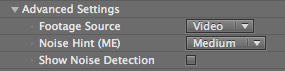
The Noise Hint pop-up is now called Noise Hint [ME] to indicate that it works with Motion Estimation. Noise Hint [ME] is still in the Advanced Settings group, and grayed out until the Motion Estimation checkbox is active. Read more
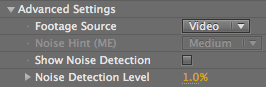
The Noise Discrimination Level pop-up has been renamed to Noise Detection Level to show that it works with the Noise Detection checkbox. The operation of both controls is the same as in Denoiser 1. Read more
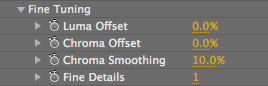
In the Fine Tuning group, there is a new control called Fine Details. This slider introduces noise back into the image as the level of detail is increased. Read more
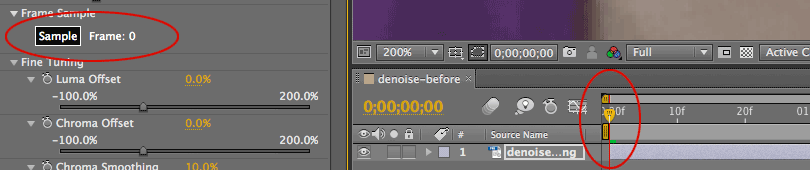
The first frame in the After Effects Timeline is now displayed as Frame 0. In Denoiser 1, the first frame was displayed as Frame 1. We changed the display to Frame 0 to match how After Effects reads where the footage in the composition begins.