Using PhotoLooks in Aperture
The PhotoLooks plug-in works the same in Aperture as it does in Photoshop. The only notable difference is that PhotoLooks can be launched either internal or external to Lightroom. Both methods are accessible through the Lightroom dropdown menu.
Launch PhotoLooks as an internal plug-in
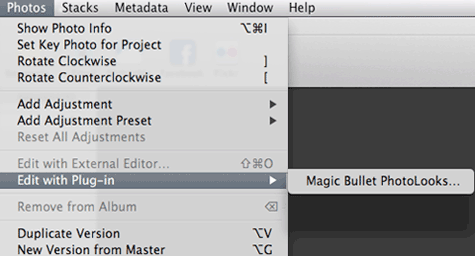
To launch PhotoLooks internally as an Aperture plug-in, choose the menu item Photos> Edit with Plug-in> Magic Bullet PhotoLooks. This opens the PhotoLooks interface.
Using Aperture's multi-select function
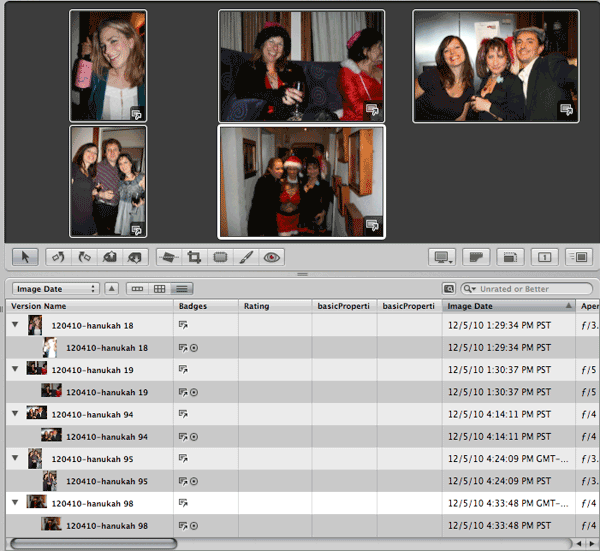
PhotoLooks fully supports Aperture 3's ability to make multiple image adjustments to any number of images at once. This means you can select multiple images in Aperture by Shift- or Command-clicking to highlight them. When you apply PhotoLooks, all of the selected images are brought into PhotoLooks as a sequence. You will see the first photo preview in PhotoLooks. Choose a Look for the first photo in that sequence, then click Apply. That photo will process and close and the next photo in the sequence will automatically open in PhotoLooks.
Multiple selection is a nice workflow enhancement that helps you to move through your photos more quickly in Aperture. It is easy to apply any PhotoLooks adjustment to multiple images.