Vignette (appears in Lens)
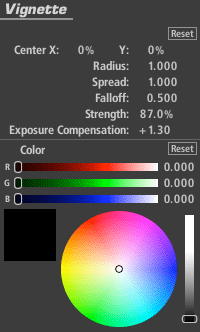
The Vignette tool darkens the edges of an image with control over darkness, tint and falloff with on-screen adjustments for size and position.
Radius: Size of the area outside which the darkening operation is at full strength. By default, this encompasses the image boundary.
Spread: Sets the start of the falloff area and is definied by a dotted line in the image. Inside the spread there is no vignette effect.
Falloff: Weights the gradient toward the spread line or toward the edge. The default of .5 causes a darkening half way between the spread line and the radius.
Strength: Specifies the extent to which the effect is applied where 0 is no effect and 100 is full effect.
Exposure Compensation: Corrects for any resulting changes in overall exposure.
Color: The vignette by default just darkens the edge toward black but the color value can push the vignette toward any color.