Diffusion (appears in Matte)
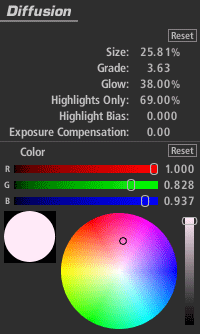
The Diffusion tool adds a diffuse glow with control over size and emulation of filter grades. Color offset lets you add a tint to the glow effect in order to emulate a tinted diffusion filter.
Size: The range of diffusion, as a percentage of total image size.
Grade: Adjusts the softness of the diffusion grade.
Glow: Amount of luminance/bloom added to highlights.
Highlights Only: The extent to which operation is restricted to the brightest regions of the image.
Highlight Bias: A lower number pushes more of the image into the Highlights region.
Exposure Compensation: Corrects for any resulting changes in overall exposure.
Color: Tints the glow area.