The LooksBuilder Interface
LooksBuilder is the custom interface of Magic Bullet PhotoLooks. LooksBuilder lets you edit or apply color design 'Looks' to the image you have selected. This interface opens as its own window, either as a plug-in or as a stand-alone application.
Use as Application: You can launch PhotoLooks as a stand-alone application and get the same functions. Just double click the alias or icon that points to PhotoLooks and a LooksBuilder interface will open. Open an image through the File> Open Image menu, then render your color design with the Save As Image command. Read more on the LooksBuilder & Photoshop page.
Use as Plugin: When you apply PhotoLooks in Photoshop, Aperture or Lightroom, a new window launches separately from the host application interface. When you click Ok to apply PhotoLooks to your image, you are brought back into the host app, and you can immediately continue to work on the image file. Read about the Aperture plug-in and Lightroom plug-in.
Two views of LooksBuilder
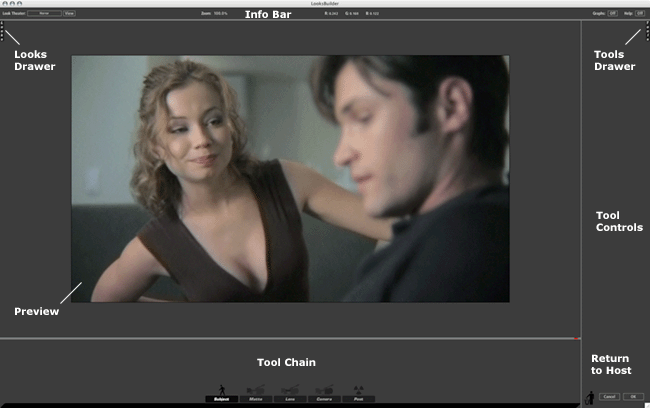
When you first apply Magic Bullet PhotoLooks to an image, the LooksBuilder interface appears empty. The left side of the screen is used to open the Looks QuickDrawer to see the gallery of Looks presets and apply them to your image. PhotoLooks provides hundreds of presets with one click, but no 'Look' is applied by default. The right side of the screen is used to open the Tools QuicKDrawer that let you use related Tools to manipulate the color design.
The two screenshots below shows the interface at its default and with many interface areas open. Of course, you would never have all of these palettes open at once! We just want to show you all the possibilities at your disposal with PhotoLooks.
The LooksBuilder as it first opens, with no color applied and no interface palettes showing.
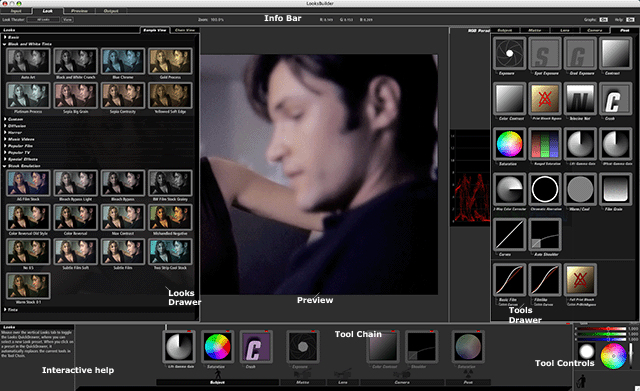
LooksBuilder with a Look preset applied and most interface palettes open.
Three Global Buttons
There are three buttons at bottom right of the LooksBuilder interface.