What is Magic Bullet PhotoLooks?
Magic Bullet PhotoLooks is a plug-in for creating stylized moods and treatments for any type of still media. PhotoLooks is a version of a popular product for video production, Magic Bullet Looks, that has been used by video editors and visual effects artists for many years.
PhotoLooks runs as a plug-in inside Adobe Photoshop, Adobe Lightroom and Apple's Aperture. The plug-in works with any image that these host apps can support, such as photographs, illustrations, graphic design work, and imported QuickTime movie frames. PhotoLooks can also be launched as a stand-alone application. See the LooksBuilder & Photoshop page for more info.
One great brand, three great products
There are actually three products under the Magic Bullet Looks brand: PhotoLooks, Looks, and QuickLooks. All three products define the style of your graphic with powerful imaging tools.
What is a 'Look'?
PhotoLooks applies and edits the color design, or 'Look', of your photograph or still graphic. The plug-in goes beyond traditional color correction tools to incorporate a wide variety of tools that, when used in combination, can create outstanding color changes for your image. For instance, make a dim blue shot appear as if it was shot at sundown. Or emulate shutter streaking effects for a film-like effect.
A 'Look' is a set of color choices that combine to create a distinct color appearance. For instance, you can choose a preset that changes the color to warmer tones and adds diffusion to an image, this changes the colors to make the image seem warm and sunny. Most people associate warm and sunny with the feeling of summer, freedom and this makes the image have a more pleasant mood. Conversely, if you choose a preset that makes the image bluer and customize the colors to feel cold and dark, the photograph can feel distant or lonely like being alone on winter's day.
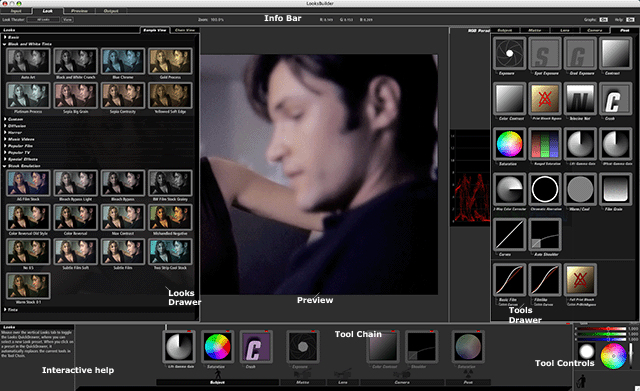
To create a Look, you will typically start with a Look preset from the Looks Quick Drawer. Tools are added to the Tool Chain when a Look preset is applied. Since a Look is built from these individual tools, you can make changes to your color design using the Tools Quick Drawer.
LooksBuilder - A Revolutionary Interface
Throughout this PhotoLooks manual, we will talk about the 'LooksBuilder'. The LooksBuilder is the interface that totally redefines how color treatments are handled. It is also the cutting edge interface that you will use to create your color looks. This is a new concept in color design, and LooksBuilder is the backbone of anything you do in PhotoLooks.
PhotoLooks is designed to make changing the color and mood of an image both simple and fast. We support the highest bit depth possible with PhotoLooks, including 32-bit floating point images. For images that run in standard 8-bit or 16-bit mode, PhotoLooks automatically and transparently upconverts the image to floating point format, performs all calculations with the highest precision, and then returns the video to the import format. This guarantees the highest fidelity for your final output.
Some of the terrific features include: