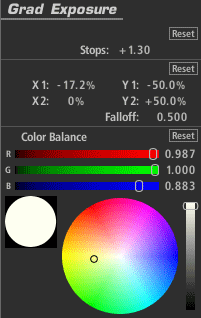
The Grad Exposure tool applies exposure adjustment in a soft rectangular area with rotation and falloff controls. The gamma setting in the Advanced I/O Input tab influences how the stops are measured.
Grad Exposure (appears in Subject, Matte, Lens, Camera, or Post)
The Grad Exposure tool applies exposure adjustment in a soft rectangular area with rotation and falloff controls. The gamma setting in the Advanced I/O Input tab influences how the stops are measured.
Stops: With a 1.0 gamma, each positive stop doubles the amount of light, while each negative stop halves it.
X1, Y1, X2, Y2: Establishes the positions of the start and end of the gradient.
Falloff: Weights the gradient toward one end or the other of the gradient.
Color Balance: Tints the exposed regions.